Showing posts with label Error. Show all posts

Tuesday, December 21, 2021

Parameter does not exist in report

 The following error occurs when a parameter value is saved in the report xml and is not on the design of the report. 


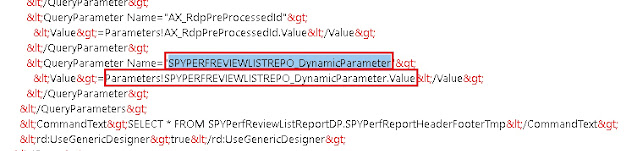
If we observe the design of the report we can notice that the parameter "SPYPERFREVIEWLISTREPO_DynamicParameter" which is reported missing does not exist on the design. Which means that the design did not sync with the XML and this parameter is still being referred with an incorrect parameter name. 


To fix this error we open the report in XML layout and replace the parameter name with "SPYPERFREVIEWDETAILSR_DynamicParameter" in this case as this is the actual name of the parameter. 


Report deployment error "Sequence contains no matching element"

 Sometimes when we change the source query of the datasets and redeploy the report we can get the error "Sequence contains no matching element"

It turned out that during the dataset restore a parameter was added. It was added at the Parameters node at the report level and the node Parameters, however if one of the parameters is deleted then this error will occur. 

So, this error occurs if a parameter name is being referred to at the dataset level and the same parameter does not exist at the report level. 

To resolve this error ensure that each parameter at the dataset level is mapped to a parameter at the report level. Also use dynamic parameters only for one dataset and not for multiple.

If the error still exists then try to recollect the parameters that you have lately modified and check if a reference for them still exists in the XML file and try to manually resolve them and map them to the newly updated parameters. Search QueryParameter in the XML and check the parameters individually for each dataset and report to identify any incorrect value and accordingly correct or remove the value from XML.

Sometimes this error can also occur is a report was deployed with Dynamic Parameter and then was changed to have Dynamic Parameter to false. In such cases make sure that you enable the dynamic parameter for the first dataset and then try to deploy again. 


SSRS Report Errors

 There are situations when runtime errors are generated by report datasets. Viewing these errors provides us information on how to debug the error.


The log for the same can be found under windows event viewer at the location Application and Services Logs ->  Microsoft -> Dynamics -> 


Each of the above nodes can be checked for the potential error. Click on the details node to get the details of the error 


Thursday, December 16, 2021

The number of defined parameters is not equal to the number of cell definitions in the parameter panel.

 When a report is duplicated the name of the report changes and this results in the change of the parameter names that are used in the reports. 

When we try to deploy a report where the parameters in the parameter section of the report design, does not match with that of the ones defined in the xml then we get this error. 

To rectify this error 

1. Open the report design and notice the parameters in the parameter panel.


 2. Open the report using an XML editor. Right click the report and choose open with 


3. Search for ReportParametersLayout section in the XML file 


As we can notice from the above the the XML is not in Sync with the design. We need to ensure that the XML is same as the design, hence we need to add a new parameter in this section called AFZSPYLEAVEAPPLICATIO_DynamicParameter which we can see in the GUI panel (step 1)

Insert a new parameter as follows in the XML and save the file. When pasting a new parameter please ensure to increment the columnIndex 


Deploy the report and it should be successfully deployed.